
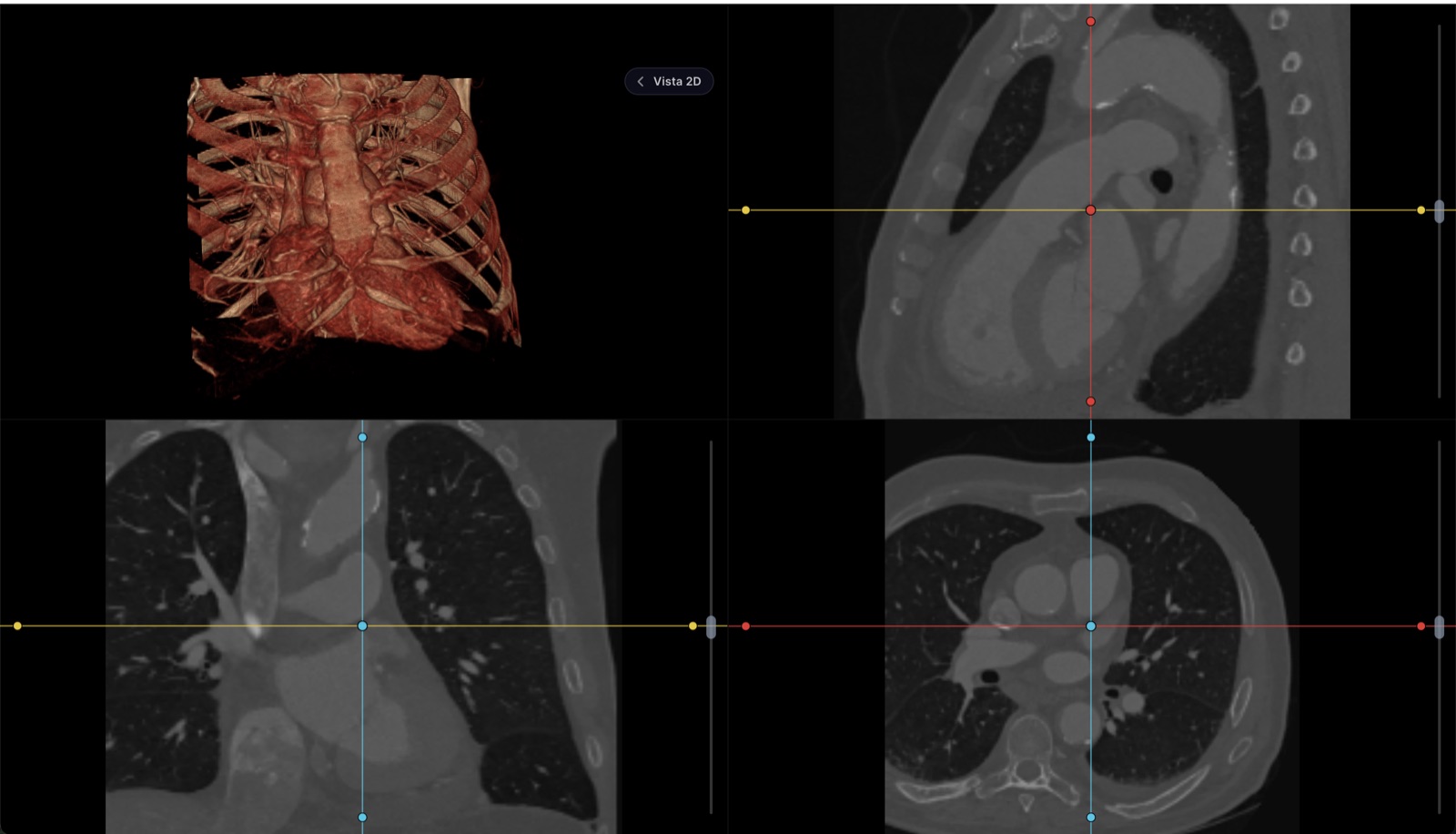
To view it, your study is not uploaded anywhere
The file is read and drawn inside your browser. It doesn't travel to our servers. Neither do your measurements or your report: they live in this tab's memory and vanish when you close it, so they leave no trace even on a shared computer. The only thing that leaves is what you choose to send: if you request the link for your doctor, the study is encrypted on this very device before upload, the key travels inside the link and never reaches us, and the file is deleted when it expires. We do keep a tally of the visit itself — how many files you opened, how much they weighed, how long it took to render and whether anything failed — so we know the viewer is doing its job; never the file names, never anything inside them.
Not for primary diagnostic reading
A formal diagnosis is issued on radiology-calibrated monitors. This tool is for reviewing, measuring, comparing and walking your patient through the study — not a replacement for the reading station.
Free, no account
View any DICOM or NIfTI series, or the PDF that comes on the CD
Window and level, zoom, cine and series comparison
Measurements in real millimeters, angles and annotations
Multiplanar reconstruction (MPR) and 3D view
Write the report and export or print it
Download your own files as a zip
Needs an account
Save the study to a patient's record
File the signed report next to the visit note
Keep measurements and key images across sessions
Receive studies straight from your machines via worklist
Share the study with the patient without burning a CD
Quick answer
How we compared them
The same criteria for all ten, and only what each vendor states on its own page or what opening a study shows: where it runs (browser or installed, and on which systems), what it really costs (free, free only for non-commercial use, trial or license), whether the study leaves your device (a viewer that processes in the browser does not upload it; a cloud one does), and what it reconstructs (only the original slices, or also MPR in three planes and 3D). Where the vendor does not publish the fact, the table says so instead of guessing.
An honest warning about this list: it is written by the team behind one of the viewers. That is why it includes the competition with its strengths and says plainly when an installed viewer is a better option than ours.
The ten viewers, in one table
| Viewer | Where it runs | Cost | Does the study leave your device? | MPR / 3D |
|---|---|---|---|---|
| Healthy Record DICOM viewer | Browser (any OS) | Free, no account | No: read inside the browser | MPR and 3D |
| IMAIOS DICOM Viewer (IDV) | Browser | Free, no account | No, per its page | MPR |
| CT Read | Browser | Free | No, per its page | Not published |
| Medicai (free tools) | Browser | Free | No, per its page | Not published |
| DicomViewer.net | Browser | Free, no registration | Not detailed | Not published |
| PostDICOM | Cloud, with an account | Free trial; paid plans | Yes: stored in its cloud | Yes |
| Weasis | Desktop: Windows, macOS and Linux | Open source (EPL), free for commercial use too | No | MPR; 3D in recent versions |
| Horos | Desktop: macOS only | Free, open source | No | MPR and 3D |
| RadiAnt | Desktop: Windows only | Annual license (from about €39 a year per its store), with a free trial | No | MPR and 3D |
| MicroDicom | Desktop: Windows only | Free for non-commercial use; commercial license is paid | No | No advanced MPR or 3D |
The notes on each one — languages, which formats it opens, what sets it apart — are in the next two sections; the table keeps to what is comparable.
In the browser, nothing to install
Healthy Record (the viewer above): free, no account, and the study is read inside the browser — nothing is uploaded to view it. Multiplanar reconstruction, a 3D view, window and level with presets, measurements in real millimeters, and it opens what actually turns up: DICOM with or without an extension, the ZIP, RAR or 7z from the CD, the CD copied as an .iso, JPG or PNG images and the report PDF. What sets it apart is the link for the doctor: up to 600 MB encrypted on your device with AES-256-GCM, valid for 72 hours and 5 openings; the key travels inside the link and never reaches our servers. Between August 15 and September 15, 2026 alone, it opened studies from 38 countries.
IMAIOS DICOM Viewer: the free viewer from the French company behind e-Anatomy. According to its page it asks for no account, data is not sent over the internet, and it offers scrolling, image manipulation and MPR tools. Interface in several languages. If you want a second opinion of a browser viewer, it is the first one we would try.
CT Read: free, no installation and — per its page — no upload; it processes the DICOM in the browser, with pages in English, Spanish, French and German. It does not publish whether it reconstructs in three planes. Medicai offers a free viewer among its tools, also processed in the browser per its page, with zoom, pan, brightness and contrast. DicomViewer.net is free and needs no registration, with less published detail about what it does with the files.
PostDICOM is a different thing: a cloud PACS with an HTML5 viewer. There the study is uploaded and stored under your account, with a free trial and paid plans. It makes sense if what you want is to store and share studies continuously, not to open a CD once.
Desktop: when you read studies every day
Weasis is open source (EPL license), free for commercial use too, and runs on Windows, macOS and Linux; it has MPR and, in recent versions, 3D reconstruction. If you are going to install a viewer in the practice without paying a license, it is the one we would recommend. Horos is free and open source, Mac only, a fork of OsiriX; capable, but new releases have been rare for years, and that shows on recent versions of macOS. RadiAnt, Windows only, is probably the fastest and most polished of them all; it charges an annual license (from about €39 a year, per its store) after a free trial. MicroDicom, also Windows, is free only for non-commercial use — the commercial license is paid — and is just enough to look at the CD: no advanced MPR or 3D.
The rule for choosing installed over browser: volume and routine. If you read dozens of heavy studies a day, offline, or on the same machine, a desktop viewer still performs better. For the patient’s CD, the study someone sent you, the second opinion or the look from another computer, installation is pure friction.
Which one to pick, by situation
| Your situation | What fits |
|---|---|
| I was given a CD and want to see it now | A browser viewer: drag the folder onto the one on this page, or onto IMAIOS or CT Read |
| I am on a Mac and Horos no longer opens | A browser viewer (Safari or Chrome); installed, Weasis |
| The computer does not allow installing programs | A browser viewer: no administrator rights needed |
| I want to send it to my doctor without carrying the CD | The encrypted link on this page: 600 MB, 72 h, 5 openings |
| I read studies every day on the same PC | Weasis (free) or RadiAnt (paid, the fastest) |
| I want to keep every study from my clinic | A PACS (PostDICOM in the cloud) or a clinical record with a built-in viewer, such as Healthy Record |
| I need to sign the formal diagnosis | A reading station with calibrated displays: no viewer on this list replaces that |
If your case is the physician’s one — the study kept in the patient’s record next to the visit — that same viewer is built into every Healthy Record plan; the details are on the pricing page (in Spanish — the product serves clinics in Mexico). And if what you have is the disc in your hand, start with how to view a CT scan online.
Frequently asked questions
What is the best free DICOM viewer?
It depends on the job. To look at a study today without installing anything, a browser viewer that processes the files on your device: the Healthy Record viewer (this page), IMAIOS DICOM Viewer or CT Read — all three are free and ask for no account. To read studies every day on the same computer, a desktop viewer: Weasis is open source and free even for commercial use, Horos is free on Mac, and RadiAnt is the fastest on Windows, though it charges an annual license. There is no absolute “best”: there is friction and installation that are either justified by what you need to do, or not.
Is there an online DICOM viewer that does not upload my files to a server?
Yes. Healthy Record, IMAIOS DICOM Viewer, CT Read and Medicai state on their own pages that the study is read inside the browser and not sent to their servers; you can check it in the “Network” tab of your browser’s developer tools while you explore a study. The exception is PostDICOM, which works as a cloud PACS: there the study is uploaded and stored under your account. In Healthy Record the only thing that ever leaves, and only if you ask for it, is the link for your doctor, encrypted on your device before upload.
What is the best DICOM viewer for Mac?
Without installing anything: any of the browser viewers, since Safari and Chrome on macOS run them the same on Intel and Apple Silicon. Installed: Horos is free and open source, although new releases have been rare for years; OsiriX MD is paid and built as a professional workstation; Weasis is open source and cross-platform. The program burned onto the CD is a Windows executable and will not launch on a Mac.
What is the best free DICOM viewer for Windows?
Installed and at no cost, Weasis (open source, EPL license) or MicroDicom (free only for non-commercial use). RadiAnt is probably the fastest and most polished, but it charges an annual license after the trial. If the computer does not allow installing programs — at work, at the hospital — a browser viewer gets it done without administrator rights.
Do I need to pay for a DICOM viewer?
To view, measure and share a study, no: there are free browser and desktop viewers with everything needed, multiplanar reconstruction included. You pay when you need more than a viewer: storage and archiving of studies (a PACS), integration with the clinical record, signed reports, or a diagnostic reading station with calibrated displays. At that point you are no longer buying “a viewer” but a system.
What is the difference between a DICOM viewer and a PACS?
The viewer opens and displays the study; the PACS receives it from the modalities, keeps it for years and delivers it to whoever asks. A free browser viewer solves “I want to see this CD”; a PACS solves “I want every study from my clinic to arrive on its own and be kept”. PostDICOM is a cloud PACS with a built-in viewer; Healthy Record builds this page’s viewer into the electronic health record, with the study stored next to the visit.